Wallpaper download instructions
After taking a look through the hundreds of pictures that I have in my collection, I have selected what I think are
the best and turned them into desktop wallpapers for you to download. By following the instructions below, you
could be gazing at an image of an MGF every time you sit at your computer. Although this is an MG web site I have
also included a number of pictures that are not MG related, so you should find something of interest.
After a recent poll amongst fellow MGF owners, I have included popular desktop resolution sizes. If you have your resolution set to something other than the sizes featured, then feel free to contact me and I will mail you a larger resolution copy.
The images here are all original and copyrighted. You may use them if they are for your personal use. If you wish to use them for any other purpose, then please ask me first.
After a recent poll amongst fellow MGF owners, I have included popular desktop resolution sizes. If you have your resolution set to something other than the sizes featured, then feel free to contact me and I will mail you a larger resolution copy.
The images here are all original and copyrighted. You may use them if they are for your personal use. If you wish to use them for any other purpose, then please ask me first.
1. Establish your screen resolution
The wallpaper images are saved in a number of popular screen sizes, including 800x600, 1024x768 and 1152x864. If
you know to which resolution your monitor is set, you can jump straight to section 2. If not, you should now check
your monitor resolution.
For windows users, carry out the following steps.
For windows users, carry out the following steps.
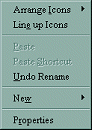
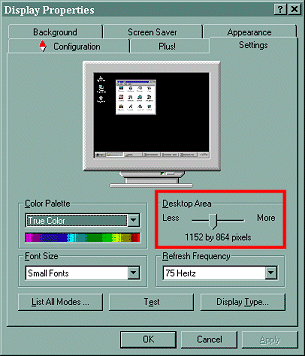
2. Select the appropriate wallpaper file
Now that you know your screen resolution you can select which picture you wish to download. On the download screen, you will
be given a list of screen sizes that the particular wallpaper is available in. If the resolution of your monitor does not
appear in the list, you should select the next nearest smaller size. For example, if your screen resolution is '1152x864'
and this is not available, you should select 1024x768.
Please note that the files are quite large (up to 160Kb) and may take some time (up to a minute or more) to download.
Please note that the files are quite large (up to 160Kb) and may take some time (up to a minute or more) to download.
3. Wait for the picture to arrive
The file will be downloaded into a new window. Although it appears to be much smaller than your screen, the
information contained there will actually fill your screen, so please be patient.
4. Save the image as your wallpaper
Once the image download has completed, you can save the image as your wallpaper. To do this, follow the steps below.